The main image workshop cuts out your product photo and delivers a main image on exactly RGB 255 at 2000 × 2000 pixels. Your first photo per account is free, each further photo costs 32 credits.
Amazon main image requirements
The main image has stricter rules than the additional images. These are the points from Amazon's product image guide and its technical image file requirements:
| Item | Requirement |
|---|---|
| Background | pure white, RGB 255, 255, 255 (#FFFFFF) |
| Fill | product fills at least 85% of the image |
| Size | 500 to 10,000 px on the longest side |
| Zoom | from 1,000 px on the longest side |
| Format | JPEG (recommended), PNG, TIFF, non-animated GIF |
| Color | RGB; convert CMYK first |
| Aspect ratio | none required, square is common |
| Content | the actual product, whole and shown once; no text, logos, graphics or watermarks, no props that aren't included |
| Packaging | only if it is an important product feature |
The catch with a pure white background photo: a gray of 250 or 253 looks white on screen but isn't pure for Amazon. Amazon doesn't say how it measures the 85%. Fashion has its own rules, such as adult clothing on a standing model and single shoes pointing left. All image rules with sources are on Amazon image requirements.
Cut out a product photo in three steps
- Take the photo
Bright, soft light without flash, the whole product in frame with some margin, the label sharp and readable, no filters. A phone photo is enough.
- Cut it out and put it on pure white
Remove the background, set the area to exactly RGB 255 and scale the product until it fills at least 85% of the image. For zoom, at least 1,000 px on the longest side.
- Measure and upload
Measure the edge and the fill before you upload. In a bulk upload the main image carries the code MAIN in its file name, for example B000123456.MAIN.jpg.
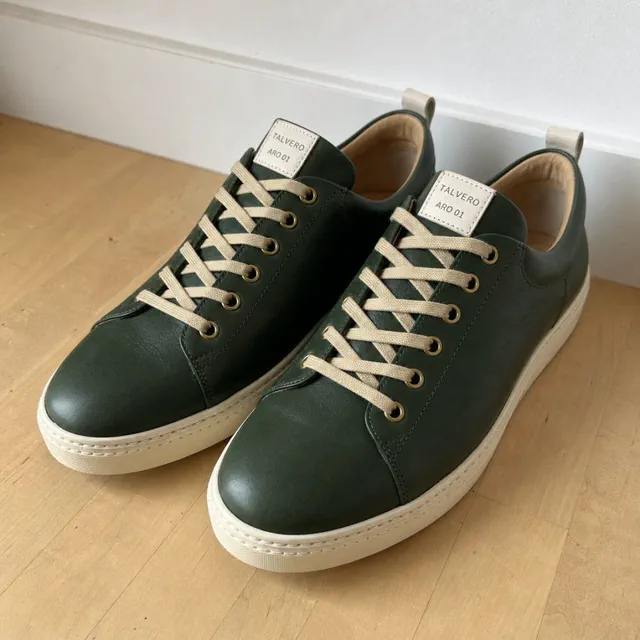
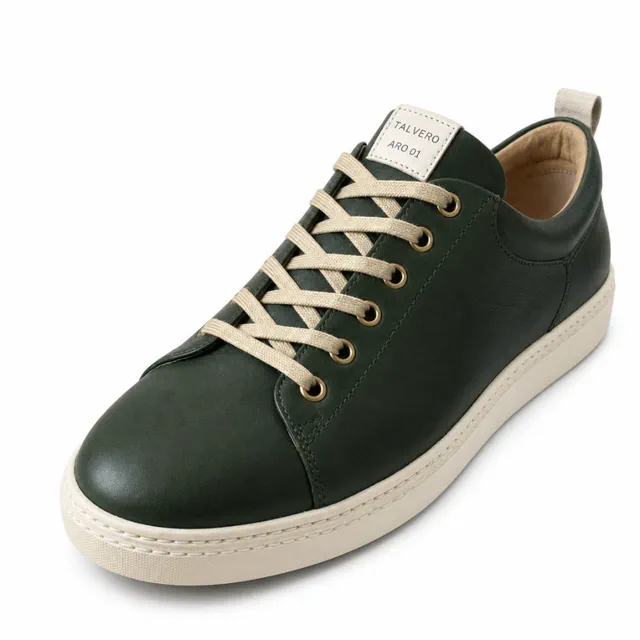
Listimo created the main image on the right from the photo on the left. It is AI-generated and labeled as such.
In the main image workshop, Listimo does step 2 for you. You upload up to 100 photos at once, as JPG or PNG; a busy background like a table or carpet usually works. Every photo becomes its own main image: product cut out, background exactly RGB 255, product at about 88% of the frame, 2000 × 2000 pixels as a JPEG. Listimo measures every result, you look at the preview and download everything as a ZIP.
For color variants of the same product, the workshop cuts out every photo in the look of the first one. With a SKU, the files are named for bulk upload right away: SKU.MAIN.jpg, SKU.PT01.jpg and so on. If decor or accessories are in the photo, you note what belongs in the image.
Common reasons for rejection
| Reason | What to change |
|---|---|
| Background not pure white | set the edge to exactly RGB 255; light gray or 250 to 254 is not enough |
| Text, logo, graphic or watermark | remove it all; benefits and dimensions go in the additional images |
| Extra items or props | show only what is included |
| Product cut off | the whole product in frame with some margin |
| Product in packaging or with tags | show the product itself; packaging only if it is an important feature |
| Product too small | zoom in or crop the margin until it fills 85% |
| Blurry or pixelated | a new, sharp photo; at least 1,000 px on the longest side for zoom |
Without a compliant main image, Amazon can suppress the listing in search.
A common case with product shots on a white background: the background looks white, but the edges sit just below 255. Image models don't hit pure white reliably either. That is why the main image workshop sets the background to exactly 255 after the cutout, without AI. If a photo can't be made cleanly white, the report says so and the photo isn't charged.
Cutout tool, photo studio or AI compared
There are three ways to an Amazon main image. What counts in the end is not how the image is made, but whether edge, fill and size are right.
| Item | Cutout software | Photo studio or agency | Listimo main image workshop |
|---|---|---|---|
| Starting point | your photo | your product, you ship it to them | your photo, a phone photo is enough |
| Background | depends on the software; you measure whether the edge is 255 | as ordered | exactly RGB 255, measured afterwards |
| 85% fill | crop it yourself | as ordered | product at about 88% of the frame |
| Image size | depends on the software | as ordered | 2000 × 2000 px, JPEG |
| Many photos | depends on the software | as ordered | up to 100 photos per run, color variants in one look, ZIP |
| Cost | depends on the provider | usually several hundred euros for an image set | 32 credits per photo, first photo free |
The workshop uses AI: an image model takes the product out of your photo, then Listimo sets the background to exactly white and the product to the right size, without AI. An AI image generator without such rules is risky for the main image, because shape, color, label and contents have to match the real product.
Try it free with Listimo
- Image checker, free and without sign-up: Drop your main image into the image checker. It measures background, fill, size and format right in your browser, your images never leave it.
- Main image workshop: Your first photo per account is cut out for free, each further photo costs 32 credits. Photos that can't be made cleanly white aren't charged.
- Image check in the toolbox: With an ASIN, Listimo measures the images that are live on Amazon for free. On request the AI finds what no pixel value shows, such as added text, logos or frames (10 credits per image).
- Listing Check: The Listing Check scores your whole listing from 0 to 100, image rules included.
You get 180 free credits to start, no credit card and no subscription. How Listimo creates the whole image set from one photo: AI product photography for Amazon.
Frequently asked questions
What background is allowed for the Amazon main image?
Pure white only: RGB 255, 255, 255 or #FFFFFF. A background at 250 or 253 looks white but isn't pure for Amazon. The free image checker measures the edge of your image pixel by pixel.
How large does the product have to be in the main image?
It should fill at least 85% of the image. Amazon doesn't say how exactly it measures that. The image checker measures the frame around the product on its longer side, and the main image workshop sets the product to about 88% of the frame.
What pixel size does the main image need?
At least 500 and at most 10,000 pixels on the longest side. Zoom works from 1,000 pixels. The main image workshop delivers 2000 × 2000 pixels.
Can I use a phone photo for the Amazon main image?
Yes, once it is cut out and on pure white. Use bright, soft light, keep the whole product in frame and the label readable. The main image workshop takes JPG and PNG, and a busy background usually works.
What does the cutout cost with Listimo?
Your first photo per account is free, each further photo costs 32 credits. If a photo can't be made cleanly white, it isn't charged. You get 180 free credits to start, no subscription.
Does the cutout change my product?
The workshop takes the product out of your photo and doesn't invent a new one: shape, color and label stay as they are. Still look at the preview before you upload the image.
More on product images: Amazon image requirements, AI product photography for Amazon, labeling AI images. More free tools: check which Amazon reviews you can get removed, Rufus checker for the questions buyers ask Amazon's AI, Amazon FBA calculator for the UK and Europe, Amazon FBA calculator for amazon.com, FNSKU label generator, UPC code generator with how to get real UPCs, EAN and UPC check digit calculator, Amazon image requirements checker, A+ content image sizes for every module, AI image label checker for Amazon, GPSR checklist for Amazon, Amazon Brand Registry checklist with trademark fees, unit price calculator for the German Grundpreis, ACOS and ROAS calculator for your ads, search terms byte counter for backend keywords and titles, product description formatter with line breaks, listing checker with a score from 0 to 100. All in one place: free Amazon seller tools. Numbers from over 1,200 checked listings: Amazon Listing Study 2026.
Sources
Updated November 19, 2026. Whether Amazon accepts an image is Amazon's decision. Details on the main image workshop: as of November 19, 2026.